The era of the “Press 1 for Sales, Press 2 for Support” IVR is effectively over. Customers today expect immediate answers, not a maze of menus. Yet, for many Customer Support Managers, shifting to Conversational AI by building a voice-based AI experience feels like a leap into the dark.
Building a voice experience is fundamentally different from configuring a text chatbot. You cannot simply copy-paste text scripts into a voice engine and expect success. Voice carries nuance, urgency, and technical complexity—from accents and background noise to the split-second latency that defines a natural conversation.
However, the payoff is tangible: automating high-volume, low-value queries stops the attrition-burnout loop and frees your human agents to focus on high-stakes interactions. Effective implementation requires more than just technology; it demands a strategy built on data, design thinking, and a deep understanding of your callers.
Here is your practical framework for building a voice-based conversational AI agent from the ground up.
The Steps to Building Out Your Conversational AI Experience
Step 1: Identify the Right Voice-First Problem to Solve
Attempting to automate every interaction immediately is the fastest route to project failure. Instead, analyze your call data to identify high-volume, repetitive queries that do not require human empathy or complex judgment. Common candidates include “Where is my order?” (WISMO), password resets, or appointment confirmations. These are “transactional” tasks that clog up your queues and bore your agents.
Tip: Don’t Try to Automate Everything at Once
Start with one clear use case that offers high impact with low complexity. Prove the value there, then expand. Your goal is to increase capacity, not replace your workforce overnight.
Step 2: Understand the Callers and Their Behavior
How a customer asks for a refund via email is different from how they ask over the phone. In text, they might type “Refund request for order #123.” On a call, they might say, “Hi, yeah, I bought this thing last week and it’s broken, can I get my money back?”
You must audit existing call recordings to capture the actual language your customers use. This “utterance collection” forms the foundation of your Natural Language Understanding (NLU) model.
Tip: Listen for Trigger Phrases
Customers rarely use the official terminology found in your internal documentation. If your internal code is “RMA Request” but customers say “send it back,” train your AI on the latter.
Step 3: Map Out Voice-Driven Call Flows
Visualizing the conversation is critical. Unlike a linear IVR, a conversational flow must be flexible. It needs to account for the “Happy Path” (where everything goes right) and the “Repair Path” (where the AI misunderstands or the user changes their mind).
Use a visual builder to design these branches. Ensure you build logic that allows the customer to loop back or correct themselves without hanging up.
Tip: Always Plan for Interruptions and Rephrasing
Humans interrupt. A robust voice asset handles “barge-ins”—allowing the caller to speak over the AI to change the subject or provide data faster—without breaking the flow.
Step 4: Choose a Voice-Ready Platform
Voice is harder than text. A chatbot can take three seconds to “think” without annoying the user. In a voice conversation, three seconds of silence feels like a dropped call. You need a platform infrastructure designed specifically for voice, with low-latency processing to ensure the conversation feels natural, not robotic.
Tip: Choose a Platform Built Natively for Voice
Avoid “bolted-on” voice wrappers for text chatbots. Look for a solution with global, redundant infrastructure (like AWS) to guarantee 99.99% availability and high voice quality6.
Step 5: Train Intents Using Real Call Audio
An “intent” is what the caller wants to achieve (e.g., CheckStatus or MakePayment). You train the AI to recognize these intents by feeding it training phrases. Theoretical phrases are often insufficient. The most effective training data comes directly from your historical call recordings.
Tip: Recordings From Real Support Calls Are Great Training Data
Don’t guess what customers say. Transcribe actual calls to build a library of real-world phrasing, including regional slang and varying sentence structures.
Step 6: Connect to Core Business Systems
An AI that cannot access your customer data is just a fancy answering machine. To deliver genuine value—like telling a customer exactly where their order is—your Conversational AI must dip into your CRM (System of Record) in real-time.
This connection must be secure and fast. If the AI has to ask, “What is your account number?” when the system should already know the caller based on their phone number, you are adding friction, not removing it.
Tip: Look for Platforms with Direct Salesforce Integration
Prioritize a Salesforce-native solution. “Native” means the AI lives within your existing trust boundary, accessing data directly without fragile third-party connectors or “swivel-chair” processes that frustrate your Salesforce Administrator.
Step 7: Write for the Ear, Not the Eye
Writing for voice requires brevity and clarity. Long, complex sentences confuse listeners because they cannot “re-read” what was just said. Use active voice and simple vocabulary. Avoid corporate jargon or “word salad” that sounds unnatural when synthesized.
Tip: Read Your Prompts Out Loud
If you stumble while reading the script, the AI will sound awkward, and the customer will tune out. If it sounds like writing, rewrite it until it sounds like talking.
Step 8: Test in Real-World Conditions
Laboratory testing is rarely enough. You must test your voice asset against background noise (traffic, office chatter), different accents, and varying connection qualities. A system that works perfectly in a quiet room may fail completely when a customer is calling from a busy street.
Tip: Test With People Outside Your Team
Your engineering team knows how to “talk to the bot” to make it work. Test with colleagues from other departments—or even friends—who will speak naturally and unpredictably.
Step 9: Ensure Security, Compliance, and Escalation Paths
Trust is the primary barrier to AI adoption. You must ensure that your AI handles Personal Identifiable Information (PII) securely, adhering to standards like SOC 2 Type II and GDPR/CCPA.
Furthermore, the AI must know its limits. There is nothing more frustrating than a bot trapping a customer in a loop.
Tip: Always Include an Agent Escalation Path
Always provide a “ripcord.” If the AI fails to understand the caller twice, or if the customer expresses frustration (sentiment analysis), the system should immediately transfer the call—with full context—to a human agent.
Step 10: Launch, Monitor, and Optimize Continuously
Go-live is Day 1, not the finish line. Once traffic starts flowing, review the “fallout” calls—the ones where the AI failed. These recordings are vital for optimization. They tell you exactly which new intents to train and where the conversation flow is breaking.
Tip: Don’t Wait for Perfection Before You Launch
Start with a beta group or a specific region. Gather data, tune the model, and then scale. Speed to value matters more than a theoretically perfect launch.
Mistakes to Avoid When Building Conversational AI
Even well-intentioned projects can stall if they fall into common traps. Avoid these pitfalls to ensure a successful rollout:
- Starting Too Broad: Trying to replace the entire agent role immediately leads to complex, unmanageable projects. Focus on automating specific tasks first.
- Using Chatbot Logic for Voice: Voice flows require different timing and error handling than text chat. Copying a chat script directly will result in a poor caller experience.
- Failing to Plan for Escalation: Trapping customers in “bot jail” destroys CSAT. Always allow a path to a human.
- Undertraining Intents: Launching with insufficient training data means the AI will misunderstand basic requests.
- Ignoring System Integrations: If the AI cannot read/write to Salesforce, it cannot resolve queries, only deflect them. This creates “empty” automation that frustrates customers.
- Not Testing on Real Users: Internal testing is biased. You need fresh ears to find the logic gaps in your design.
Why Use Natterbox to Build Conversational AI?
Building “from scratch” does not have to mean building alone. Natterbox provides the infrastructure and tools to deploy intelligent voice automation rapidly within the environment you already trust.
Built for Voice From the Ground Up
Natterbox is not a chatbot company trying to do voice. We are voice experts. Our global architecture is built on AWS to ensure low latency and high call quality, ensuring your AI responds instantly and naturally.
Seamless Salesforce Integration
We are 100% Salesforce-native. This means your Conversational AI has immediate, secure access to all customer data stored in Salesforce. It can identify callers, look up records, and update cases in real-time without complex API patchwork. Your agents never have to toggle screens or hunt for context—it is all there in the record.
Enterprise-Level Security and Compliance
For your Salesforce Administrator and IT Director, Natterbox delivers peace of mind. We offer “Show Your Work” traceability, allowing you to verify exactly why the AI made a decision. With SOC 2 Type II compliance and ISO 27001 certification, your data remains secure within your existing trust boundary.
Ready for a Conversation?
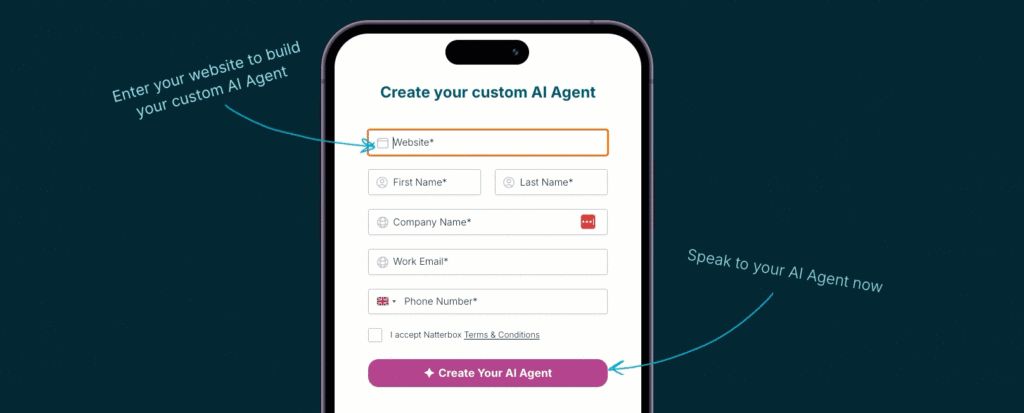
There’s no point building a Conversational AI experience with a poor quality voice solution – so try ours out for yourself. Enter your business website to activate your custom AI Agent. Within 60 seconds, you’ll be able to phone in and have a real conversation.
Role-play as a customer or a lead for your business, and hear it in action.